his is a calculator that resembles a typical scientific calculator ,
albeit a simpler version. In our version, we have only included the
trigonometric functions and the logarithmic functions. The reason of
creating a simpler version of the calculator is to help users to learn
the programming concepts in a gradual manner and not to confuse them
especially those who are learning to program in Visual Basic.
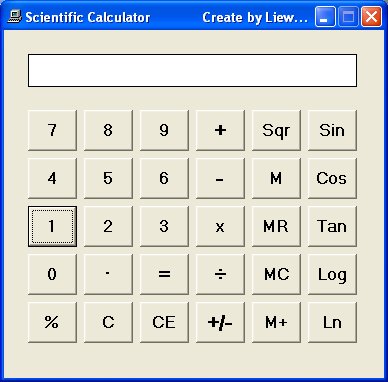
To design the interface, we just to need to modify the interface of the basic calculator
that we have created earlier using Visual Basic 6. In this calculator,
we have added five more buttons, they are Sin, Cos, Tan, Log and Ln.
The common trigonometric functions in Visual Basic 6 are Sin, Cos, Tan
and Atn.
a) Sin is the function that computes the value of sine of an angle in radian.
b) Cos is the function that computes the value of cosine of an angle in radian.
c) Tan is the function that computes the value of tangent of an angle in radian.
d) Atn is the function that computes the value of arc tangent of an angle in radian.
Log computes the value of logarithm to base 10 whilst Ln computes the value of natural logarithm.
An angle in degree has to be converted to radian before it can be
calculated by the above trigonometric functions. From high school
mathematics, we know that π radian is equivalent to 180°; which means 1
radian is equivalent to π divided by 180. Therefore, in order to convert
an angle x from degree to radian, we have to multiply x by (π/180).
However, there is a small problem because it is rather difficult to
obtain the precise value of π, fortunately, there is a way to do it in
VB. First of all, we know that an arc tangent of 1 will return the value
of 45° which is π/4 radian. So, to obtain the value of π, just multiply
the arc tangent of 1 with 4. Now, we are ready to enter the code for
all the above additional buttons.
For the Sin button, enter the following code:
Private Sub CmdSin_Click()
sinx = Round(Sin(displayValue * 4 * Atn(1) / 180), 4)
panel.Caption = sinx
End Sub
* The Round function is to correct the output to certain number of decimal places.
For the Cos button, enter the following code:
Private Sub CmdCos_Click()
cosx = Round(Cos(displayValue * 4 * Atn(1) / 180), 4)
panel.Caption = cosx
End Sub
For the Tan button, enter the following code:
Private Sub CmdTan_Click()
tanx = Round(Tan(displayValue * 4 * Atn(1) / 180), 4)
panel.Caption = tanx
End Sub
For the Ln button, enter the following code:
Private Sub CmdLn_Click()
panel.Caption = Log(displayValue)
End Sub
and for the Log button, enter the following code:
Private Sub CmdLog_Click()
panel.Caption = Log(displayValue) / Log(10)
End Sub
The interface is shown below:
Scientific Calculator created using Visual Basic 6
“ মা হল পৃথিবীর একমাত্র ব্যাংক, যেখানে আমরা আমাদের সব দুঃখ, কষ্ট জমা রাখি এবং বিনিময়ে নেই বিনাসূদে অকৃত্রিম ভালোবাসা ”
হুমায়ূন আহমেদ
বিখ্যাত মনিষীদের স্বরণীয় কিছু উক্তি
বুদ্ধিমানেরা কোনোকিছু প্রথমে অন্তর দিয়ে অনুভব করে, তারপর সে সম্বন্ধে মন্তব্য করে । আর নির্বোধেরা প্রথমেই মন্তব্য করে বসে এবং পরে চিন্তা করে । -হযরত আলী (রাঃ)"
সত্য একবার বলতে হয়; সত্য বারবার বললে মিথ্যার মতো শোনায়। মিথ্যা বারবার বলতে হয়; মিথ্যা বারবার বললে সত্য ৰলে মনে হয়।
“প্রত্যেককে বিশ্বাস করা বিপদজনক, কিন্তু কাউকে বিশ্বাস না করা আরো বেশী বিপদজনক”
এই পৃথিবী কখনো খারাপ মানুষের খারাপ কর্মের জন্য ধ্বংস হবে না , যারা খারাপ মানুষের খারাপ কর্ম দেখেও কিছু করেনা তাদের জন্যই পৃথিবী ধ্বংস হবে” আইনস্টাইন
একজন আহত ব্যক্তি তার যন্ত্রনা যত সহজে ভুলে যায়, একজন অপমানিত ব্যক্তি তত সহজে অপমান ভোলে না -জর্জ লিললো








0 মন্তব্য(গুলি):
Post a Comment